Overview of CapturePlus Additional Features
CapturePlus provides a feature that lets users print captured screens for added convenience.
Print Feature
You can print captured screens directly to a printer with a variety of options.
The available options include margins, center alignment, fit to paper size, maintain original aspect ratio, paper orientation, and the number of copies to print.
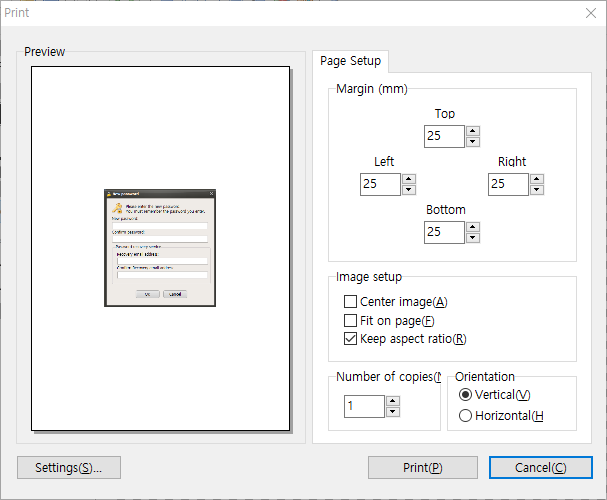
CapturePlus also offers many more features throughout its menus than can all be listed here.
Once you try it, you will immediately see how powerful it is.
Today's News/Tips
How to Install oCam in a Different Location
If you run the oCam installation file from the command line with a specific parameter, you can change the installation path as you want. This allows you to install the program in a folder of your choice instead of the default installation path.
To change the installation path, use the following parameter:
`"/dir=installation path"`
This parameter is used to specify the desired installation path when running the installer. For example, if you want to install oCam in a specific folder, simply add this parameter when entering the command.
To apply the parameter, follow these steps:
1. Open the Start menu and select 'Run'. Or press the Windows key + R shortcut to open the Run dialog box.
2. In the Run dialog box, enter the command in the following format:
`"installer file path" "/dir=installation path"`
For example, if the oCam installer file is located at `C:\Downloads\oCam_Setup.exe` and you want to install it to `D:\Program Files\oCam`, enter the following command:
`"C:\Downloads\oCam_Setup.exe" "/dir=D:\Program Files\oCam"`
When you run the above command, oCam will be installed to the specified path, `D:\Program Files\oCam`. This method is useful for users who want to customize the installation process, especially if they want to organize programs in a specific directory.
It is important to enter the parameter correctly in the command line, and both the installer file path and the installation path should be enclosed in quotation marks so that the command runs properly even if spaces or special characters are included. With this simple method, you can freely change the installation path of oCam.