End-of-Support Dates for Windows Operating Systems
End-of-Support Dates for Windows Operating Systems
-
Windows XP
Release date: December 31, 2001
End of support: April 8, 2014 -
Windows Vista
Release date: January 25, 2007
End of support: April 11, 2017 -
Windows 7
Release date: October 22, 2009
End of support: January 14, 2020 -
Windows 8
Release date: October 30, 2012
End of support: January 10, 2023 -
Windows 10
Release date: July 29, 2015
End of support: October 14, 2025
Since operating systems that have reached end of support no longer receive security updates, it is recommended that you switch to a different operating system for safe use.
Today's News/Tips
oCam Advanced Settings - Mouse Cursor Effects - Highlight Effects
Click Tools - Options on the oCam main menu, then open the Effects category to check the Highlight Effect settings.
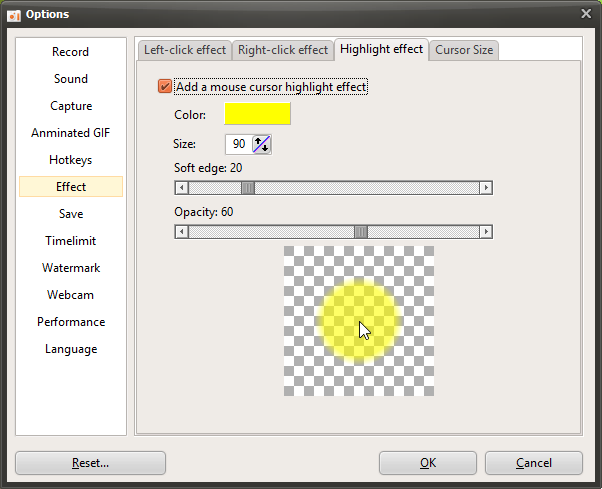
The Highlight Effect is used to help viewers immediately recognize the current position of the mouse cursor while watching a video.
The options are described below.
Color
- This is the color applied to the highlight effect. It is set to yellow by default.
Size
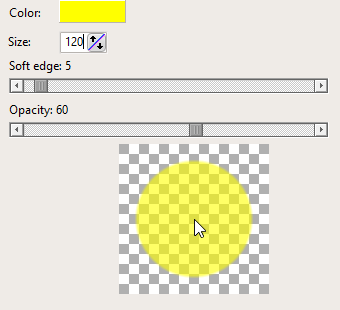
- When the highlight effect is enabled, a semi-transparent circle is drawn around the mouse cursor. This option sets the size of that circle. It is set to 90 by default.
Soft Edge
- The higher this value becomes, the softer the edge of the circle appears.
Opacity
- The lower this value is, the more transparent the circle becomes.
Preview
- Lets you preview the mouse effect you have configured.
If the opacity value is set too high, the highlight effect may cover the part of the screen where the mouse is located. For that reason, it is best to use an appropriate opacity setting.