How to Fix the Black Screen Issue After Recording in Windows XP
For Windows XP, normal operation may not be guaranteed because Microsoft has ended support for this operating system. (Reference)
This issue occurs because the program you are trying to record is using the overlay mixer.
The easiest way to solve the problem is as follows.
Right-click on the desktop and click Properties.
The Display Properties window will appear. Click the Settings tab.
Click the Advanced button.
Click the Troubleshoot tab.
As shown below, Hardware acceleration is set to Full. Change it to None.
After setting it as shown below, click OK, close the program you want to record, and then try recording again.
Today's News/Tips
Overview of CapturePlus Screen Capture Features
It offers a variety of capture methods, from easily capturing an entire scrollable screen that does not fit on one page by using Window Scroll, to letting users manually select an area to capture.
Each capture is added to a new tab, and options such as automatically saving each capture to the clipboard or automatically saving it as a file to a desired location can be changed in Preferences.
Each capture feature also has a default hotkey assigned, and these hotkeys can also be changed in Preferences to suit your needs.
Each function provides powerful capture options for different situations, so if you try them out yourself, you should be able to get familiar with them without much difficulty.
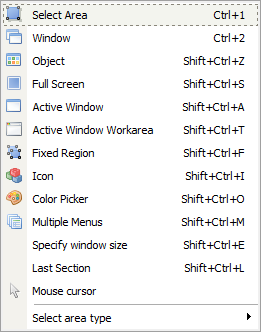
-Select Area (Shift+Ctrl+R): Lets the user manually select the area to capture.
-Window (Shift+Ctrl+W): Helps the user select by window.
-Window Scroll (Shift+Ctrl+C): Easily captures the entire scrollable screen in browsers and Microsoft Office products.
-Object (Shift+Ctrl+Z): Unlike Window Capture, this allows more detailed selection.
-Full Screen (Shift+Ctrl+S): Captures the entire screen.
-Active Window (Shift+Ctrl+A): Captures the currently active program window.
-Active Window Work Area (Shift+Ctrl+T): Captures only the content area of the active program window, with the frame removed.
-Capture Inside a Fixed Rectangle Area (Shift+Ctrl+F): Lets you select a capture area based on the fixed size set in Preferences.
-Window Icon (Shift+Ctrl+I): Lets you select a program area and automatically extracts the icon when selected.
-Color Capture (Color Picker) (Shift+Ctrl+O): This tool, commonly called a color picker, lets you extract the color at the current mouse position on the screen.
-Set Window Size (Shift+Ctrl+E): Lets you select a window, resize it, and then capture it.
-Menu (Shift+Ctrl+M): When a program menu or a shell extension menu opened by right-clicking is displayed, pressing the menu capture hotkey captures only that exact area.
-Last Capture Area (Shift+Ctrl+L): Captures the same area that was used most recently.
-Mouse Cursor Capture: Captures the current mouse cursor.