What to Check If You're Curious How Far Autonomous Driving Technology Has Come
If you want to check practical, real-world materials on autonomous driving, Tesla is the first place to look.
https://www.youtube.com/@tesla
Here is a recent video of Tesla's autonomous self-delivery.
This video alone shows that autonomous driving has become a reality.
China is also advancing very quickly, and there are many related test-drive videos. Watching them feels like getting a glimpse of the future.
This is the world's first video of a vehicle being delivered autonomously.
A Tesla Model Y drove itself from the Texas Gigafactory to its new owner's home about 30 minutes away. It traveled through parking lots, highways, and city streets before arriving at its new owner.
Today's News/Tips
oCam Quick Overview of Key Features
oCam (oCam) Key Features Overview
You can see the following screen when you run the program.
Select one of the top tabs to choose the recording type first: Screen Recording, Game Recording, or Sound Recording, and then start.
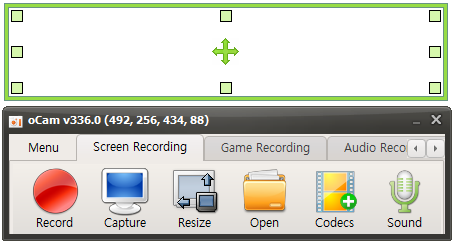
This is a brief explanation of the buttons for each function.

Record - Pressing this button starts recording immediately. The recorded video can be viewed by pressing the Open button.

Capture - Captures the screen.

Open - Opens the folder containing recorded videos, recorded audio, and captured images in Windows Explorer.

Codec - Sets the codec to use when pressing the record button in oCam.
By default, you can use oCam's built-in codec, hardware codecs such as NVIDIA NVENC, and VFW (external codec).
You can also select GIF recording.
Sound - For screen recording and sound-only recording, you can set whether to record only system sound, record both system sound and microphone, or not record sound.
Game Recording - To record a game, click the Game Recording button. When the Game Recording button is activated, activate the game window and then press the recording hotkey to start recording.
In addition, you can configure many detailed program features in Menu -> Options.
Recording Area - There is a large rectangle, several small square boxes, and a drag-shaped icon in the center.
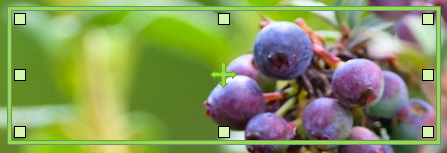
The large rectangle is the recording or capture area.
The small squares can be dragged to adjust the size of the recording or capture area.
The drag icon in the center can move the recording or capture area.
You can also move it more precisely by using the arrow keys together with Ctrl and Shift.