Can I record only the computer system sound and save it as MP3?
Not only video recording, but audio recording is also now supported.
You can record through the following simple steps.
In the oCam main window, click the Sound tab at the top.
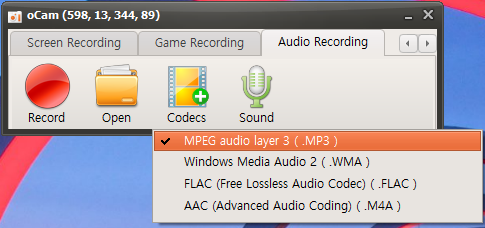
Then the mode is changed to audio recording.
In this state, when you click the Record button, system sound is recorded instead of screen recording.
Then click the Codec button as shown below to set which audio file type to save.
(Currently, MP3, WMA, FLAC, and M4A extensions are supported.)
1. MP3 (MPEG-1 Audio Layer 3)
- Features: MP3 is the most widely used audio compression format, developed in the 1990s.
- Compression method: It uses lossy compression, which greatly reduces file size.
- Sound quality: Some audio data is lost during compression, so quality may drop compared to the original. However, at 192 kbps or higher, most users may not notice a clear difference.
- File size: About 2.4 MB per minute at 320 kbps, which is relatively small.
- Compatibility: It is supported on almost all devices and software, making it suitable for streaming, downloading, and playback.
- Use case: Commonly used for portable music players, online streaming, and everyday music listening.
2. WMA (Windows Media Audio)
- Features: An audio format developed by Microsoft, designed as an alternative to MP3.
- Compression method: Supports both lossy and lossless compression modes.
- Sound quality: Claimed to provide better quality than MP3 at the same bitrate, though the actual difference is often minimal. Lossless WMA preserves original audio quality.
- File size: Similar to MP3 in lossy mode; in lossless mode, files are much larger (about 10~20 MB per minute).
- Compatibility: Strong support in Windows environments, though compatibility may be weaker on other platforms such as macOS or some Android devices.
- Use case: Mainly used in Windows-based software and Microsoft products such as Xbox; DRM support makes it suitable for protected content distribution.
3. FLAC (Free Lossless Audio Codec)
- Features: A popular lossless audio format among audiophiles.
- Compression method: Uses lossless compression, preserving 100% of the original audio data.
- Sound quality: Provides original-quality audio with no loss, suitable for high-resolution playback.
- File size: Much larger than MP3, but about 50~70% smaller than the original WAV file (roughly 20~30 MB per minute).
- Compatibility: Supported by most advanced audio players and software, but may be difficult on some low-spec or older devices.
- Use case: Suitable for high-quality music listening, audio archiving, and studio work where preserving quality is important.
4. M4A (MPEG-4 Audio)
- Features: An MPEG-4 based audio format mainly used by Apple, including AAC (Advanced Audio Coding) and ALAC (Apple Lossless Audio Codec).
- Compression method: Supports lossy AAC and lossless ALAC.
- Sound quality: AAC is more efficient than MP3 and often provides better quality at the same bitrate. ALAC preserves original quality as lossless.
- File size: AAC is similar to or slightly smaller than MP3 (about 2 MB per minute), while ALAC is similar in size to FLAC (about 20~30 MB per minute).
- Compatibility: Strongly supported on Apple devices (iTunes, iPhone, iPad) and macOS; some Android devices or other platforms may require additional codecs.
- Use case: Mainly used in iTunes, Apple Music streaming, and podcasts, with AAC suitable for streaming and efficient storage.
Additional tips
- If you prioritize quality: choose FLAC or M4A (ALAC).
- If you prioritize file size and compatibility: choose MP3 or M4A (AAC).
- In Windows environments: WMA is also a good option, but MP3 may be more universally compatible.
- For Apple device users: M4A is most suitable, and AAC is especially good for streaming and saving storage.
Today's News/Tips
How to Use the x264vfw External Codec
oCam supports external codecs (VFW), and here we will look at how to use the x264 codec.
You can download the x264 codec from the site below.
https://sourceforge.net/projects/x264vfw/
Go to the site and click the Download button.
The download will start automatically.
On the installation screens, just keep clicking Next.
Accept the license agreement.
Specify the installation path.
The installation is complete.
Click Finish.
After installing the codec, you must restart oCam before it will appear in the external codec list.
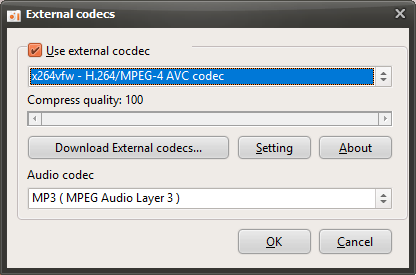
After restarting oCam, click the Codec button in the oCam main window, then click the External Codec menu.
Select the Use External Codec checkbox.
From the list, select x264vfw - H264/MPEG-4 AVC codec.
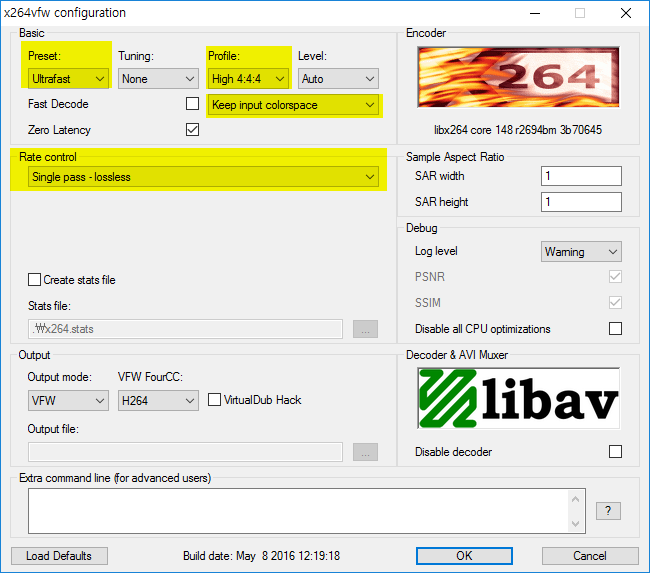
Then click the Settings button to view the detailed codec settings.
The codec settings window will appear as shown below. Since we need to record the screen in real time rather than perform normal video encoding, select Ultrafast in Preset and check the Zero Latency checkbox so that encoding is performed as quickly as possible, then click the OK button.
( This setting method is useful for real-time recording, and you can adjust it as needed depending on your situation. )
After configuring it this way, your recording will use the x264 codec.
* For game recording, if the game you want to record is 64-bit, you must also install the 64-bit version when installing x264vfw ( by default, it is installed automatically unless you change the installation options ). Then run x264vfw - Configure x264vfw64 from the Start menu and configure it the same way as described above.
* The x264vfw settings Keep/Accept only YUV 4:2:0, Keep/Accept only YUV 4:2:2, and Keep/Accept only YUV 4:4:4 are not supported, and recording will fail if you use those settings.