A Quick Look at VirtualDVD Features
Features of product
* Completely 100% FREE Software
* All supported CD/DVD/Blu-ray image formats
CloneCD (*.ccd), CDRWin (*.bin), Cue Sheets (*.cue), CDImage (*.img), ISO (*.iso),
BlindRead (*.bwt), BlindWrite (*.b5t; *.b6t), Alcohol 120% Image (*.mds;*.mdf),
Disc Juggler (*.cdi), Instant CD/DVD (*.pdi), Compressed ISO (*.isz), Nero (*.nrg),
CloneDVD (*.dvd), CDSpace6 (*.LCD), Media Data eXtended (*.MDX), Media Descriptor Sidecar(*.MDS)
* Emulate up to 24 SCSI devices in all
* Perform image mounting to local NTFS folders
* Customize virtual drives: change a drive letter, DVD region
* Support Encrypted isz(Compressed ISO) file
How to Start
VirtualDVD is very easy and simple.
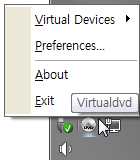
1. Click(Left or Right) the VirtualDVD's trayicon.
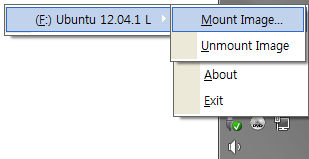
2. Select Menu(Virtual Devices->Mount Image).
3. Select CD/DVD Image file.
- Trayicon Menu
- Mount Image Menu
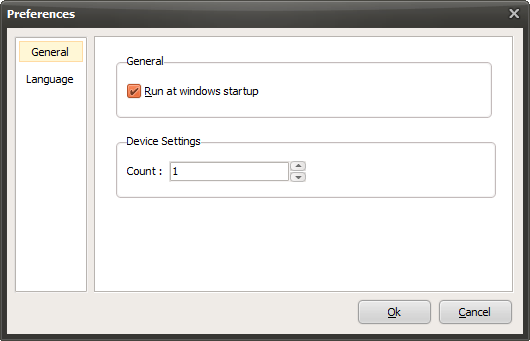
- Preferences
Today's News/Tips
oCam Advanced Settings - Animated GIF
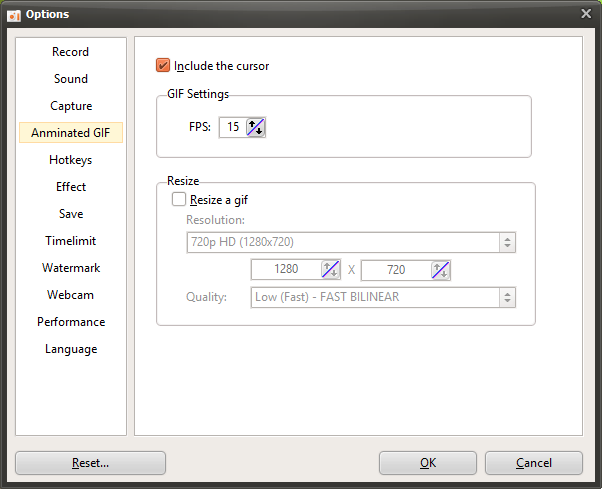
oCam is versatile software that not only supports screen recording and capture but also provides a GIF animation feature, allowing users to save short video clips as lightweight and easy-to-share GIF files. In the settings window that appears when you click the "Tools - Options" menu, the "Animated GIF" category on the left provides options for adjusting settings related to GIF creation. This tab applies when you click the "Codec" button in the main oCam window and choose the "Animated GIF (.GIF)" codec, and it is useful for optimizing the quality and format of GIF files. Below is a detailed explanation of the main settings in the "Animated GIF" category.
Overview of GIF Settings
The settings in the "Animated GIF" category are options that apply when recording in GIF format in oCam, and they are only enabled when the codec in the main window is set to "Animated GIF (.GIF)." GIF is a format suitable for sharing short animated clips on social media, websites, or messaging apps because the file size is relatively small and it can be played easily on most platforms. Through these settings, users can adjust the visual elements and quality of the GIF as needed.
Include Mouse Cursor
The "Include Mouse Cursor" option determines whether the mouse cursor will be included when recording a GIF animation. By default, this option is checked, so the mouse cursor is included in the GIF. This is useful when creating GIFs for tutorials, software demos, or situations where you want to emphasize mouse movement. For example, if you want to show the process of clicking a specific button in a GIF, including the cursor is effective. On the other hand, if the cursor is unnecessary or you want a cleaner GIF, you can disable this option to record without the cursor.
GIF Settings - FPS
The "GIF Settings - FPS" option sets the number of frames per second for the GIF animation. FPS directly affects both the smoothness of the GIF and the file size. Choosing a higher FPS, such as 30 FPS, makes the GIF play more smoothly, but the file size may become larger. On the other hand, choosing a lower FPS, such as 10 to 15 FPS, reduces the file size but may make the animation look less smooth. Users should choose an appropriate FPS based on the requirements of the sharing platform or file size limits. For example, for a short GIF uploaded to social media, 15 to 20 FPS is usually enough to get a natural-looking result.
Resize
The "Resize" option sets the output resolution of the GIF animation and works in the same way as the settings under the "Recording - Resize" tab. This setting applies only to the GIF codec and allows users to adjust the size of the GIF to the resolution they want. The supported resolution presets are as follows:
4320p UHD 8K (7680x4320), 2160p UHD 4K (3840x2160), 1440p QHD (2560x1440), 1080p FHD (1920x1080), 720p HD (1280x720), 480p (854x480), 360p (640x360), 240p (426x240), 144p (256x144), 120p (160x120), 96p (128x96)
Half Size: Reduces both the width and height of the recording area by half.
Specify Width Only and Keep Height Fixed: Sets the width while adjusting the height to match the original aspect ratio.
Specify Height Only and Keep Width Fixed: Sets the height while adjusting the width to match the original aspect ratio.
Custom: Lets the user directly enter the width and height to adjust the size exactly as desired.
Since GIF files are generally easier to share when the file size is small, it is common to choose a lower resolution such as 720p or below, or use the "Half Size" option. However, if you set a GIF to a very high resolution such as 8K, the file size can increase dramatically, so it is important to choose the settings while considering the upload limits and intended use of the platform.
Usage Tips
The settings in the "Animated GIF" category play a key role in creating GIF animations quickly and effectively. For example, if you want to make a short clip for social media, you can set the FPS to 15 to 20 and the resolution to 480p or 720p to optimize file size. Including the mouse cursor is useful when you want to highlight user actions, but if you prefer a cleaner visual style, it is better to leave the cursor out. Also, after creating a GIF, you can check the file size and, if necessary, re-record it with a lower FPS or resolution to match the limitations of the target platform.
GIF uses lossless compression, so it can maintain clear images without quality loss, but the number of colors may be limited, so it is a good idea to preview the result when recording screens with complex colors. Setting the save path in advance in oCam can also help you quickly find and use the GIF files you create.