How to Change the SecretFolder Password
When you run SecretFolder, a password entry window appears on the screen as the program starts for user authentication. This window contains a text field where you can enter your password, and you must enter the password you are currently using exactly. After entering the password, click the OK button to launch SecretFolder normally and access your protected files.
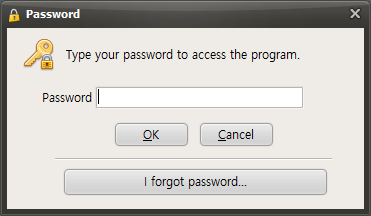
To change the password while SecretFolder is running, first find the Preferences button in the program window. Clicking this Preferences button opens the settings menu, where you can adjust various SecretFolder options.
When the Settings menu opens, find and click the "Change Password" button among the available options. This button is usually located under the security-related settings and may be labeled "Change Password" Clicking the Change Password button opens a new window where you can proceed with changing your password.
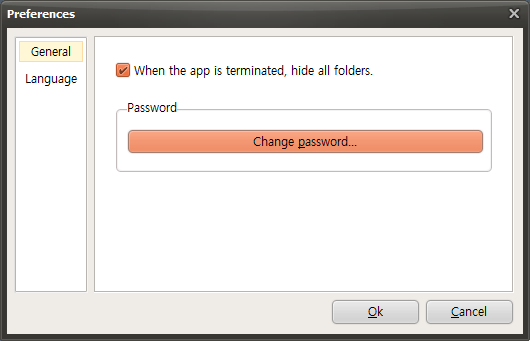
When the password settings window opens, you will see an input field where you can enter a new password. Carefully enter the new password you want to use here. For security, the password should be sufficiently long and complex, and you may need to enter the same password again for confirmation. Once all entries are complete, click the OK button to finish changing the password. After that, you will be able to access SecretFolder using the newly set password.
Today's News/Tips
How to Reduce the Size of Recorded Video Files When Recording Games (NVIDIA Codec)
If you are using the NVIDIA NVENC H.264 codec by default, the recorded file size may be very large.
Click the Codec menu in oCam to check whether you are using the NVENC H.264 codec, as shown below.
In the oCam Codec menu, click Hardware Encoder Settings.
The Hardware Encoder Settings window will appear as shown below. You can reduce the size of the recorded video file by changing the options highlighted in the yellow box.
First, let's look at how to reduce the size of the recorded file using variable bitrate.
( Rate Control must be set to 1-PASS VBR. )
The Quantizer value can be set from 1 to 51.
The lower the Quantizer value, the better the video quality, and the higher the Quantizer value, the lower the video quality.
In other words, the recording quality is defined by the range from the minimum Quantizer value to the maximum Quantizer value.
For example,
If the minimum Quantizer value is 1 and the maximum Quantizer value is 13, the recording quality range is 1 to 13.
If the minimum Quantizer value is 1 and the maximum Quantizer value is 51, the recording quality range is 1 to 51.
If the minimum Quantizer value is 13 and the maximum Quantizer value is 51, the recording quality range is 13 to 51.
In conclusion, to reduce the size of a recorded video file, increasing the minimum and maximum Quantizer values will lower the recording quality and reduce the file size.
You can adjust the Quantizer values depending on your needs, as follows.
If you want to maintain the highest recording quality while lowering the quality at certain points to reduce the size of the recorded video, set the minimum Quantizer value to 1 and set the maximum Quantizer value to a higher number depending on how much you want to reduce the quality.
( Example: Minimum Quantizer: 1, Maximum Quantizer: 30 )
If you want to maintain medium quality while lowering the quality as much as possible at certain points to reduce the size of the recorded video, set the minimum Quantizer to 26 and the maximum Quantizer value to 51.
For reference, the minimum Quantizer value cannot be greater than the maximum Quantizer value.
That is, the minimum Quantizer value <= the maximum Quantizer value.
Caution: If you set both the minimum Quantizer value and the maximum Quantizer value to 1, the recorded video file size will become extremely large, so do not use this setting.
The default values in oCam are a minimum Quantizer value of 1 and a maximum Quantizer value of 13, and we recommend setting them within the following range.
Minimum Quantizer >= 1 and Maximum Quantizer value >= 13
Next is how to reduce the size of the recorded video file using constant bitrate.
Change Rate Control to 1-PASS CBR and then set the average bitrate.
The higher the average bitrate, the better the video quality. The lower the bitrate, the lower the video quality and the smaller the recorded file size.
Finally, there is a method that uses a fixed Quantizer parameter.
Set Rate Control to 1-PASS Fixed Quantizer Parameter.
Unlike VBR, there is no concept of minimum and maximum Quantizer values, and the quality is set using a fixed Quantizer value.