How to Change the SecretFolder Password
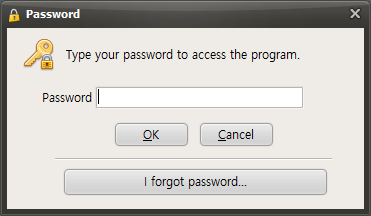
When you run SecretFolder, a password entry window appears on the screen as the program starts for user authentication. This window contains a text field where you can enter your password, and you must enter the password you are currently using exactly. After entering the password, click the OK button to launch SecretFolder normally and access your protected files.
To change the password while SecretFolder is running, first find the Preferences button in the program window. Clicking this Preferences button opens the settings menu, where you can adjust various SecretFolder options.
When the Settings menu opens, find and click the "Change Password" button among the available options. This button is usually located under the security-related settings and may be labeled "Change Password" Clicking the Change Password button opens a new window where you can proceed with changing your password.
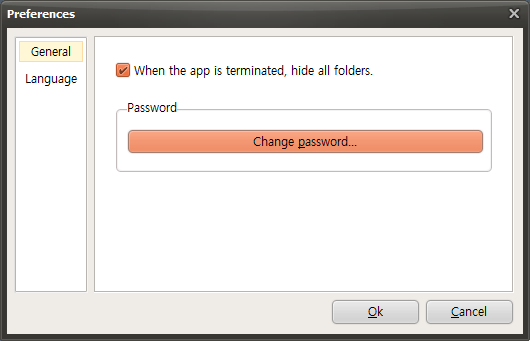
When the password settings window opens, you will see an input field where you can enter a new password. Carefully enter the new password you want to use here. For security, the password should be sufficiently long and complex, and you may need to enter the same password again for confirmation. Once all entries are complete, click the OK button to finish changing the password. After that, you will be able to access SecretFolder using the newly set password.
Today's News/Tips
What to Do If the "Cause: failed to avio_open(error=-13)" Error Occurs During Recording
This error may occur because AhnLab V3 or Avast falsely detects oCam as suspicious. Below is a detailed explanation of how to resolve the issue for each antivirus program.
For AhnLab V3, if oCam is being falsely detected, you can resolve the issue by adding the `oCam.exe` file in the oCam installation folder to the scan exclusion list.
1. Open the AhnLab V3 program.
2. Go to the Settings menu and find the 'Scan Exclusions' or 'Exclusion Settings' option.
3. In the 'File/Folder Exclusions' section, click the 'Add' button.
4. Go to the folder where oCam is installed, for example `C:\Program Files\oCam`, and select the `oCam.exe` file.
5. Add it to the exclusion list and save the settings.
6. Run oCam again and check whether recording works normally.
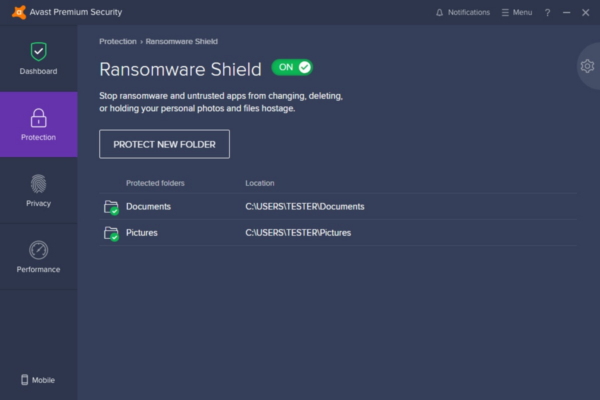
* There may also be a conflict with the anti-ransomware feature.
For example, if drive E is set as a ransomware-protected drive and oCam's save folder is also set to drive E, an error may occur during recording. This happens because the anti-ransomware feature restricts file writing on that drive, preventing oCam from saving the video file.
In this case, keep drive E as a ransomware-protected drive and set oCam's recording save folder to drive C or D instead.
Because drive E is configured as a ransomware-protected drive, file creation and modification are restricted for security purposes, so programs such as oCam are blocked from saving files there. Therefore, the simplest solution is to move the save path to drive C or another unrestricted location.
If you want to continue using drive E, you may also consider temporarily disabling the anti-ransomware setting or adding the oCam executable file (`oCam.exe`) as an exception in the security policy for that drive.
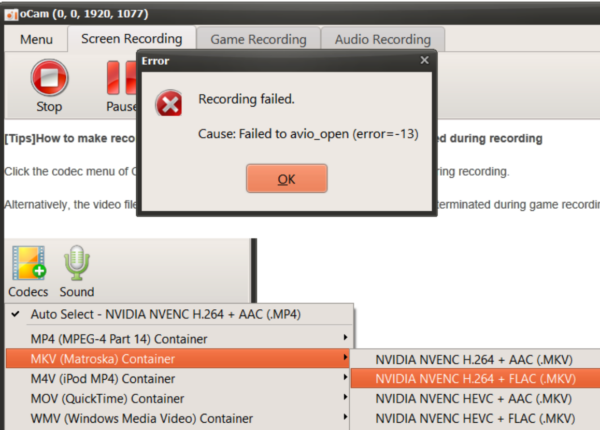
For Avast, if oCam is falsely detected, a pop-up message like the one below may appear. In that case:
1. In the pop-up, click the 'Allow App' button to register oCam as a trusted program.
2. This will remove the error and allow oCam to work normally.
If the pop-up does not appear, you can adjust the allow settings manually:
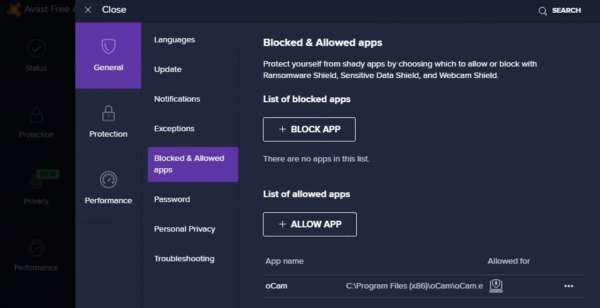
1. On the Avast main screen, click 'Menu' and then select 'Settings'.
2. Go to the 'Blocked & Allowed Apps' section.
3. Click the '+ Allow App' button and add the oCam executable file (`oCam.exe`).
4. Once oCam has been added to the allowed apps list, save the setting and run oCam again. Recording should then work without any issues.
As an alternative, you can also disable part of the protection feature:
1. Open the 'Protection' menu on the Avast main screen.
2. Find the 'Ransomware Shield' option and turn it off.
3. Disabling Ransomware Shield may resolve the error related to oCam.
You can choose and apply whichever method is more convenient. If the problem continues even after changing the antivirus settings, it may also help to contact AhnLab or Avast customer support.