CapturePlus Icon

CapturePlus

Never miss the moment you need β€” precise and smart CapturePlus

CapturePlus Screenshot

Various Capture Modes

Region, window capture, color picker & more.

Easy to Use

Intuitive interface anyone can use effortlessly.

Image Editing Tools

Edit immediately: arrows, shapes & more.

CapturePlus - 100% Free Screen Capture Tool

A completely free screen capture and image editing program for everyone, anytime, anywhere. It is the simplest and fastest tool in the world, supporting all Windows versions from Windows 7 to Windows 11, with multiple capture modes and built-in editing features. It supports over 20 image formats, multi-monitor environments, and many other convenient functions.


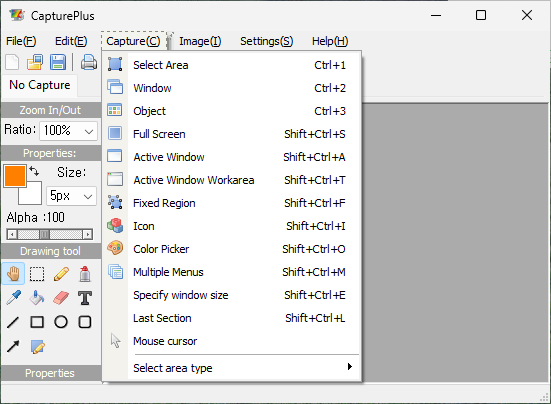
Multiple Screen Capture Options

Various Image File Support
  • Region Capture – freely select a specific area
  • Window Capture – capture an entire window
  • Object Capture – capture individual UI elements
  • Full Screen Capture – capture the whole monitor
  • Active Window – capture only the current window
  • Active Window Workspace – capture without title bar or borders
  • Fixed Rectangle – capture a predefined rectangle area
  • Window Icon – extract icon images from windows
  • Color Picker – grab color codes from screen
  • Menu Capture – capture drop-down menus accurately
  • Custom Size – capture with user-defined dimensions
  • Last Capture Area – reuse the last captured region
  • Mouse Cursor – capture with cursor included

Image Editing & Extra Tools

Easy Installation and Useful Features
  • Built-in Editor – edit images immediately after capture
  • Text, Arrows, Shapes – add annotations and highlights
  • Invert Colors – emphasize with color inversion
  • Black & White Effect – convert to grayscale
  • Saturation Control – adjust color tones
  • Brightness Adjustment – fine-tune brightness
  • Rotate & Flip – rotate or mirror images
  • Resize – adjust image resolution freely
  • Change Canvas Size – resize overall canvas including margins
  • Hotkeys – quick capture with keyboard shortcuts
  • File Naming Rules – auto-assign names when saving
  • Image Quality – set compression and quality
  • Tray Icon – quick access from system tray

System Requirements

CPUPentium 4 2.5GHz
Memory1GB RAM
Graphics1024x768, 16-bit or higher
OSWindows 2003 / Vista / 7 / 8 / 10 / 11
LicenseFree for everyone